Searching ImmPort Shared Data
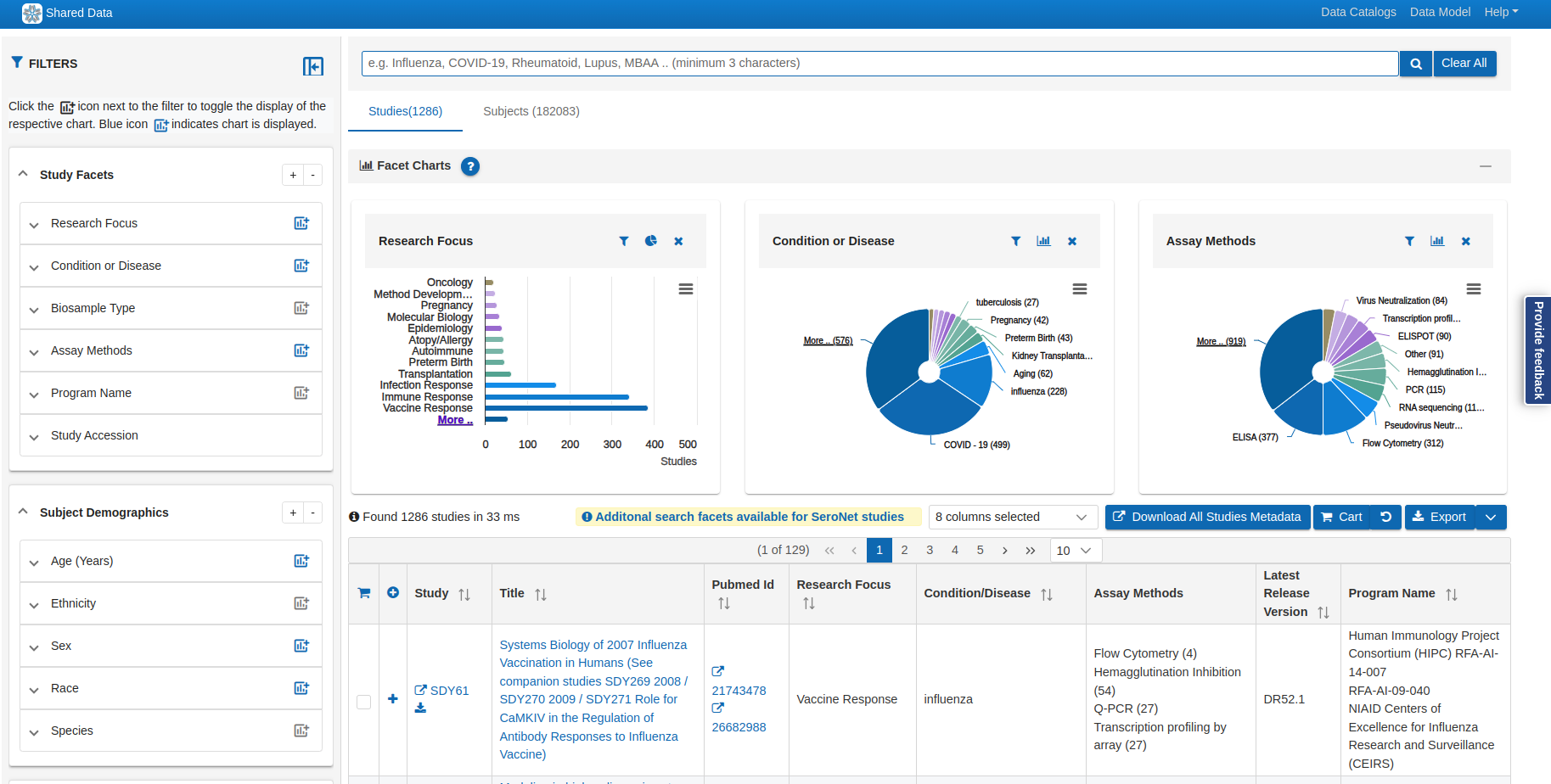
The ImmPort Shared Data Search interface (also referred to as the Cohort Discovery Tool, or CDT) allows you to browse and filter the full catalog of publicly available ImmPort studies. It combines free-text keyword search with a rich set of visual facet filters to help you quickly find studies relevant to your research.
Access the search interface at: immport.org/shared/search
Free-Text Search
The search bar at the top of the page supports keyword searches across study metadata including titles, descriptions, conditions, and accession IDs.
- Auto-suggest — as you type, matching terms appear in a dropdown list
- PubMed IDs — numeric string matching will surface studies linked to a specific PubMed ID
Facet Filters
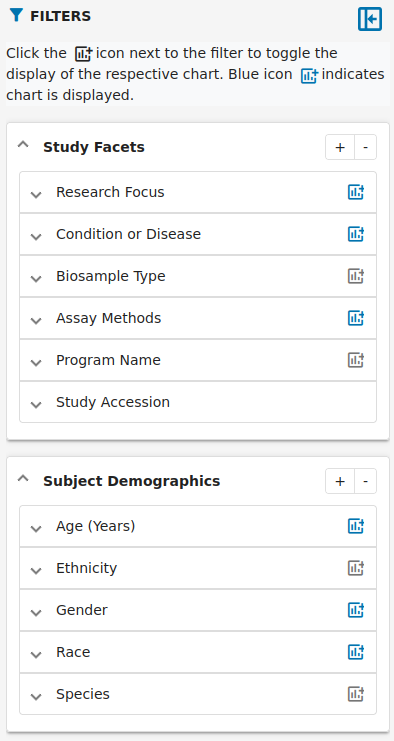
The left panel provides three groups of facet filters. Selecting a value within any facet narrows the study results and updates the counts across all other facets in real time.
Click FILTERS (or the filter icon) to show or hide the filter panel. Click the chart icon next to any facet group to toggle its bar chart visualization — a blue icon indicates the chart is currently displayed.
Study Facets
| Facet | Description |
|---|---|
| Research Focus | Broad research category (e.g., Vaccine Research, Infection Response, Oncology, Atopy/Allergy) |
| Condition or Disease | Specific disease or condition studied (e.g., COVID-19, Influenza, Tuberculosis) |
| Biosample Type | Type of biological sample collected from subjects |
| Assay Methods | Experimental techniques used (e.g., Flow Cytometry, ELISA, RNA Sequencing, PCR, ELISPOT) |
| Program Name | NIAID funding program associated with the study |
| Study Accession | ImmPort study accession identifier (SDY prefix) |
Subject Demographics
| Facet | Description |
|---|---|
| Age (Years) | Age range of enrolled subjects |
| Ethnicity | Subject ethnicity breakdown |
| Sex | Subject sex breakdown |
| Race | Subject race breakdown |
| Species | Human or animal model studies |
Miscellaneous
| Facet | Description |
|---|---|
| Is Clinical Trial | Filter to studies registered as clinical trials |
| Has Lab Tests | Studies that include lab test panel data |
| Has Assessment Tests | Studies that include assessment component data |
Use Clear All to reset all active facet selections.
Facet Charts
Each facet can display a horizontal bar chart showing the relative distribution of studies across its values. Charts provide a quick visual overview of what is available before applying a filter. Click any bar in a chart to apply that value as a filter.
Search Results
The results area shows the number of matching Studies and Subjects (e.g., Found 1,447 studies in 16 ms). Results are displayed in a paginated table with configurable columns.
- Columns — use the column selector to show/hide up to 8 metadata columns per study
- Pagination — navigate pages using the page controls; set the number of rows per page (default: 10)
- Download All Studies Metadata — downloads a metadata file for all studies currently in the result set
- Cart — add studies to your cart for batch download
- Export — export the current result page
SeroNet Studies
Additional search facets are available specifically for SeroNet studies via a dedicated search interface linked from the results area.
Searching via APIs
In addition to the browser-based search interface, ImmPort provides several APIs that allow programmatic access to shared study data — useful for scripting queries, integrating results into pipelines, or automating large-scale discovery workflows.
Shared Data API
The Shared Data API exposes the same underlying study and subject data available in the CDT. You can query studies, subjects, biosamples, lab tests, and more using HTTP requests.
- Swagger UI — interactively explore and test all available endpoints at https://www.dev.immport.org/data/query/swagger-ui/index.html
- Python and shell examples — see the Shared Data API documentation for code samples
HAPI FHIR API
For studies with FHIR-compatible resources, the HAPI FHIR API provides HL7 FHIR R4 endpoints to query ResearchStudy, Patient, Specimen, and related resources.
GA4GH DRS API
The GA4GH DRS API provides standards-based access to ImmPort data objects, enabling cross-repository discovery using the GA4GH Data Repository Service specification.
Gene Lists API
The Gene Lists API allows querying curated gene lists associated with ImmPort studies, supporting expression and signature-based searches.
API Authentication
Most read operations on public shared data do not require authentication. Downloading controlled-access data or submitting data requires an ImmPort account and an API token — see the Authentication Service documentation.
Tips
- Combine free-text search with facet filters for the most targeted results
- Facet counts update dynamically — use them to gauge dataset availability before drilling in
- Study accession IDs (e.g.,
SDY1234) can be entered directly in the search bar - Use the Shared Data API for automated or large-scale queries that go beyond what the browser interface supports