How to Download Data
Legacy Browser (Aspera) — Retirement Notice
The Legacy ImmPort Data Browser (Aspera Connect) will be retired in July 2026, along with its associated download tool.
Please migrate to the Updated Data Browser for web-based downloads, or use the APIs or Download Client for programmatic access.
Legacy download documentation is available here.
ImmPort provides multiple ways to download data — through the web interface or programmatically using APIs. Authentication is required to download data from ImmPort. You can register here.
Web Interface
Single File Download
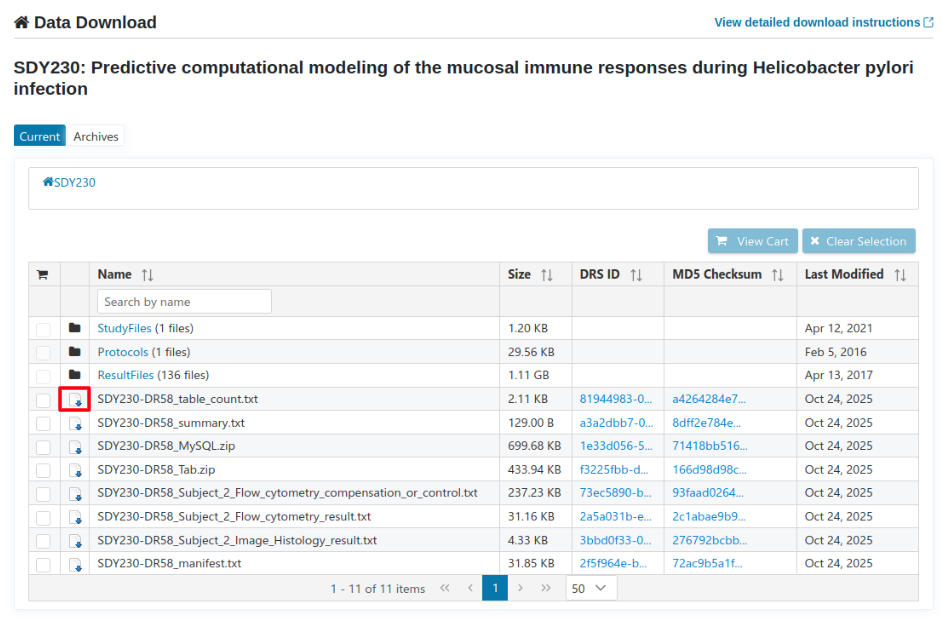
- Navigate to a study download page.
- Click the Download icon next to a file.
- The file will download directly through your browser using a secure, time-limited URL.
Multiple File Download
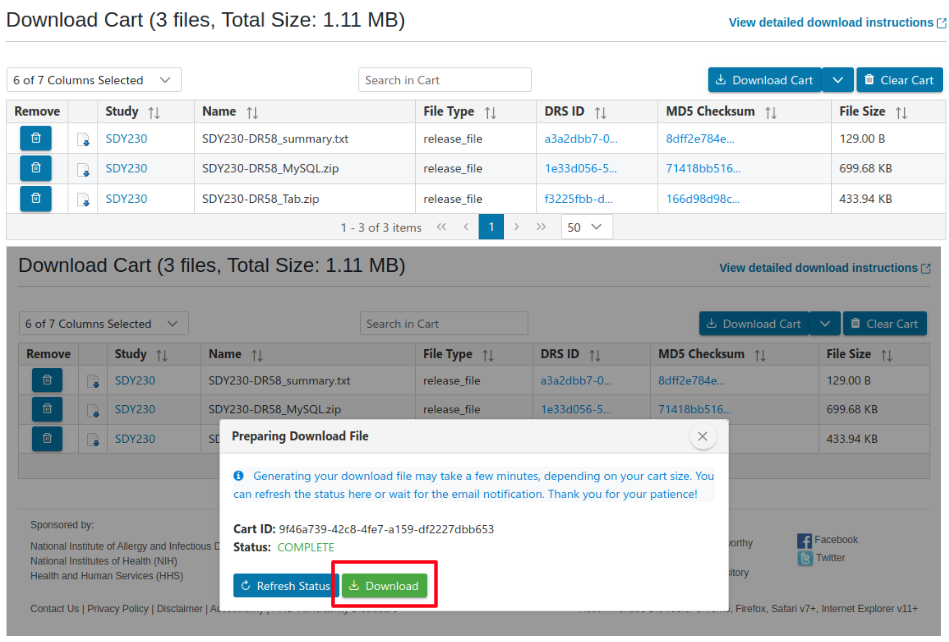
- Select multiple files (across one or more studies) and add them to your Download Cart.
- When you download the cart:
- A background job is created to generate a ZIP archive containing all selected files.
- A Signed CloudFront URL is created for the ZIP which expires in 7 days upon receipt.
- You can refresh the cart status on the download page to check progress
- You will receive an email notification once the download is ready.
- Depending on the cart size, the process may take several minutes.
Complete Study Package (ALL_DATA)
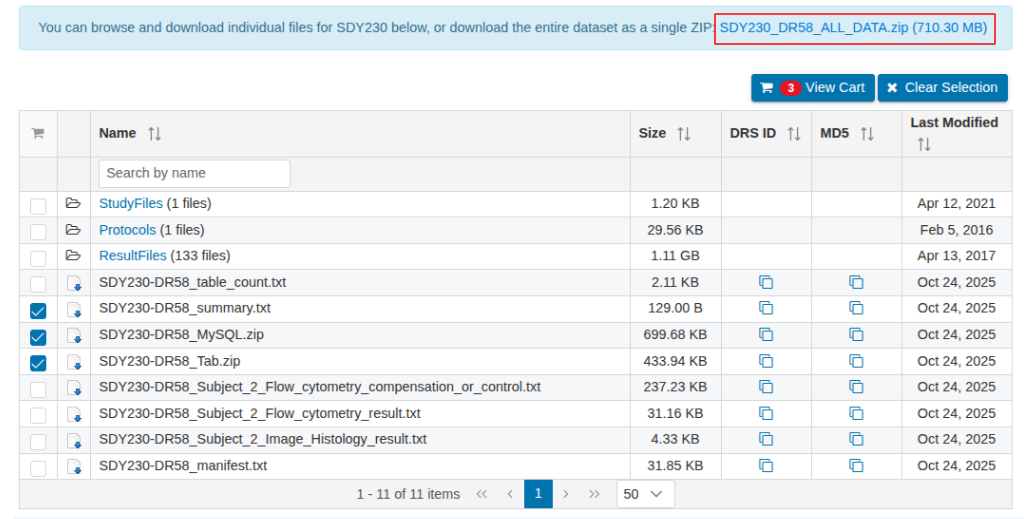
Each ImmPort study release provides a complete download package as a single ZIP file, containing all study data for a given data release version.
The package includes:
- Study metadata (curated into the ImmPort Data Model)
- Raw study files, protocol files, and result files
- Template-formatted data files (txt)
To download, click the SDYXXX_DRXX_ALL_DATA.zip link on the study download page.
Programmatic Access
ImmPort Shared Data API
The ImmPort Shared Data API provides programmatic access to study file manifests and file downloads.
- Study File Manifest endpoint — retrieve the list of files for a given study.
- Download Study Files endpoint — download individual study files programmatically.
Refer to the full Swagger documentation for all available endpoints.
GA4GH DRS API
The GA4GH Data Repository Service (DRS) API provides a standard interface for resolving logical file identifiers (UUIDs) to physical download URLs, regardless of where files are stored.
ImmPort supports two DRS access methods:
- S3 Signed URL — generates a pre-signed AWS S3 URL (expires after 7 days). Files are stored in
us-east-1(N. Virginia). - Streaming URL — streams the file in bytes directly from the source. Suitable for cloud analysis platforms such as Cavatica and Terra.
All DRS endpoints require an ImmPort API key passed as a Bearer token. See the API Keys documentation for instructions on obtaining a key.
Step 1 — Resolve a DRS object to access UUIDs
export token="REPLACE_WITH_API_KEY"

curl -H "Authorization: Bearer $token" \
     "https://drs.immport.org/ga4gh/drs/v1/objects/ddd17e17-e2d5-418a-8e6b-42487726b9a6"
Response:
{
  "id": "ddd17e17-e2d5-418a-8e6b-42487726b9a6",
  "description": "SDY1-PLN_2013-11-25_09-14-44.txt",
  "name": "PLN_2013-11-25_09-14-44.txt",
  "size": 38327,
  "mime_type": "text/plain",
  "self_uri": "drs://drs.immport.org:/ddd17e17-e2d5-418a-8e6b-42487726b9a6",
  "checksums": [{ "checksum": "318c6e107b98a406fed3c2e906eb6996", "type": "md5" }],
  "access_methods": [
    { "access_id": "83097414-06f6-46d7-a7dc-ac6e5609ce2e", "type": "https" },
    { "access_id": "5e10e701-c48b-44da-9450-617d8b1f3a82", "type": "s3", "region": "us-east-1" }
  ]
}
The response returns two access UUIDs:
| Type | Access ID | Method |
|---|---|---|
https |
83097414-06f6-46d7-a7dc-ac6e5609ce2e |
Streaming URL |
s3 |
5e10e701-c48b-44da-9450-617d8b1f3a82 |
S3 Signed URL |
Step 2a — Get the Streaming URL
curl -H "Authorization: Bearer $token" \
     "https://drs.immport.org/ga4gh/drs/v1/objects/ddd17e17-e2d5-418a-8e6b-42487726b9a6/access/83097414-06f6-46d7-a7dc-ac6e5609ce2e"
Response:
{
  "url": "https://drs.immport.org/ga4gh/drs/v1/stream/ddd17e17-e2d5-418a-8e6b-42487726b9a6/83097414-06f6-46d7-a7dc-ac6e5609ce2e"
}
Step 2b — Get the S3 Signed URL
curl -H "Authorization: Bearer $token" \
     "https://drs.immport.org/ga4gh/drs/v1/objects/ddd17e17-e2d5-418a-8e6b-42487726b9a6/access/5e10e701-c48b-44da-9450-617d8b1f3a82"
Response:
{
  "url": "https://immport-strides-prod-shared-data.s3.amazonaws.com/SDY1/StudyFiles/PLN_2013-11-25_09-14-44.txt?..."
}
ImmPort Download Client
The ImmPort Download Client provides a command-line interface (CLI) to download files from ImmPort using the DRS (GA4GH Data Repository Service) standard transfer methods.
It authenticates using an ImmPort API key, processes a manifest file, and downloads all files listed in the manifest to a specified output directory.
Download the Client
The client is available for all major platforms:
| Platform | Download |
|---|---|
| Linux | immport-download-client |
| macOS | immport-download-client |
| Windows | immport-download-client.exe |
Authentication — API Key
The client requires an ImmPort API key for authentication. You can provide it in one of two ways:
--api_key_file— path to the JSON file downloaded from the ImmPort API Keys page when creating an API key.--api_key— the raw API key token value (string).
To generate an API key, visit https://www.dev.immport.org/auth/api/keys, select the appropriate scopes (browse, download), and download the key file.
You can obtain a manifest file in one of the following ways:
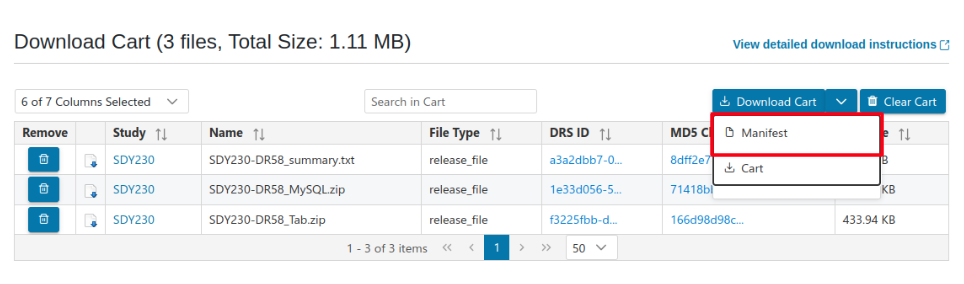
- From the Download Cart in the ImmPort UI
After selecting multiple files across studies, click “Download Cart” → “Generate Manifest” to create a manifest file for programmatic download.
- From a Study Download Page
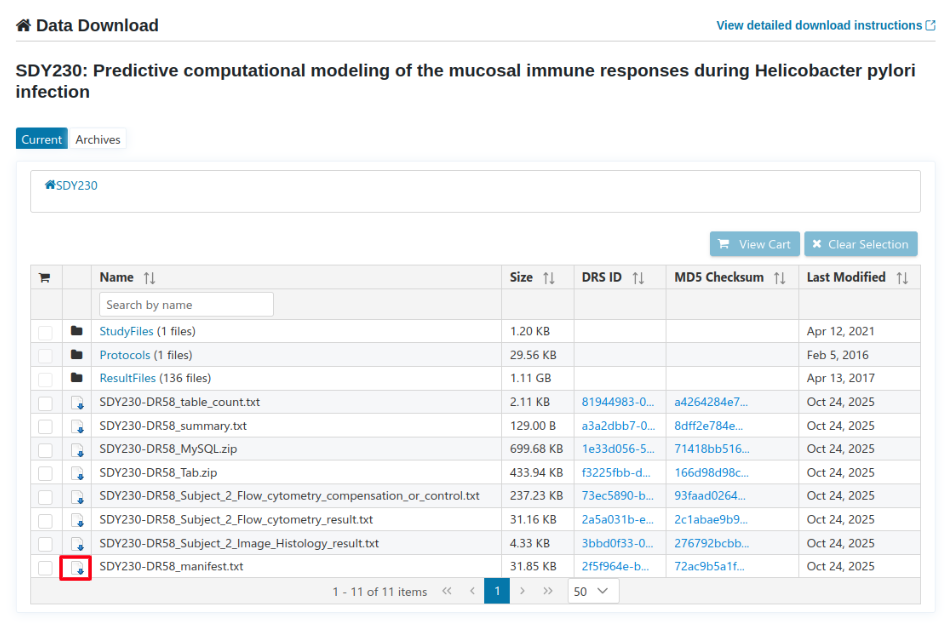
Each study page provides a ready-to-use manifest.
Example:SDY230_DR58_manifest.txtas shown below.
- Example Manifest Format
STUDY_ACCESSION FILE_NAME   FILE_TYPE   DRS_ID  MD5_CHECKSUM    FILESIZE_BYTES  PATH
SDY230  SDY230-DR58_table_count.txt release_file    81944983-0aaf-4b55-a1ef-e2681c8b258b    a4264284e7d57466b58e3e8a0510190e    2158    SDY230/SDY230-DR58_table_count.txt
SDY230  SDY230-DR58_summary.txt release_file    a3a2dbb7-0a77-4389-9816-401f07395d29    8dff2e784ea36b6695ca9326f442a293    129 SDY230/SDY230-DR58_summary.txt
Usage
Using an API key file (recommended):
immport-download-client \
  --api_key_file /path/to/api-key.json \
  --manifest /path/to/manifest.txt \
  --output_directory /path/to/output \
Using an API key value directly:
immport-download-client \
  --api_key REPLACE_WITH_API_KEY \
  --manifest /path/to/manifest.txt \
  --output_directory /path/to/output \
Windows Usage
On Windows, use immport-download-client-windows.exe in place of immport-download-client in the commands above.